When adding a
system to stocks as trade as normal starting off as SHORT, on Wolesley, Aviva
and Goldman Sachs, the system did not produce any exit order after the first
trade was placed, also the beep continued beeping while this error was occurring
( beeping stopped when trade deleted)
when doing the same operation in reverse, ( E.g adding it as a long) it worked
ok on some stocks but not on others.
Suggests its the API not understanding the given order price
Idea for a safety catch is a warning beep if a symbol in the open position list does not have a matched exit order in the open orders list below, then a sound file called "no stop" would help us to notice this. Also some flashing dot on the screen would be good in case sound is turned off for some reason.
simple explanation
After leaving
the program on all night, it developed a very sluggish speed and had to wait a
long time after
clicking things for the result to happen. Perhaps hogging up the ram? or maybe
some of the data I pulled off was
still held in the ram? other programs running on the pc were not affected and
were working as normal.
Ideas to check, perhaps the list of errors and trades are held in ram ? If the got sent over to the database and the program window then called from access instead, this might help. Probably I am wrong but its just a guess.
Alternatively the API could be clogged up in some way, and some detection of this "clogging" would be able to detect when the program needed unclogging.
Some automatic API disconnect - re connect function ( when stops are miles away from hitting and markets are slow ) would be a solution if that is the problem.
Adding a trade ( selecting stance long and trade at next stance change, it placed an order and when it went short, there was no stop placed, this happened twice and i suggest it is to do with the API getting the wrong valve and not understanding it.
Tested with (GS) Goldman Sachs. (USA time) 230pm to 9pm
(see no1)
When RTS had been running for several hours with a few symbols added, it was unable to get prices on new symbols that were added ( "market closed") error message came up. On restarting the RTS program the symbols that had been added then got prices and test trades were possible ( I think this is connected to bug no1 with something getting clogged up)
MAIN WINDOW.
No way to see if the trades on are long are short, which is very confusing.
Need to put red font for short
blue for long, and the same for the open order window. If this is to difficult
then perhaps shade the background
behind the font pink or light blue instead. (As with IG ) Again if this
is too difficult then place a LONG or SHORT next to the trade in main window.
Also in the spare space at the end, it could display which system is engaged.
INSTRUMENT
WINDOW.
Delete symbol button not working, this is needed when information is entered
wrong.
In the add
instrument pane, the tab leads the mouse pointer over to the search by name
pane from symbol, but it
should run down from id, symbol, name type, and then over to search boxes.
When in a long
FTSE trade with global 0.5 risk setting.
I Went to settings tab and reduced setting to 0.25 but this did not alter the
order which was waiting.
( it was an order to sell 80 per point ( to reverse a 40 per point long trade)
and the order should have been
deleted and replaced with a 60 order.
After waiting for the stance to change, the new order became 60 to buy in a
short of 40 which is correct. but
it needs to happen immediately on the global change....( If the markets
suddenly went crazy, the user may want to reduce or increase risk per trade
with a single action, hence the importance)
Also in the percent risk box, we need to be able to type anything, (other than
the actual figures indicated)
allowing tiny % such as 0.00001 etc for when we begin with real money on live
account.
Utilities tab
Both date and time panes need to be about 10 mm wider to show full date.
Once export
file is pressed, the user has no idea if its working or not, so a progress bar
would be good.
or estimated time remaining.
Main tab,
Position information needs to be completed. ( I sent you all the calculations in email a while back, please test with a few different stocks GS(USA), RBS, FTSE, WOS etc) as the decimal points seem to be a source of errors)
ADD
SYMBOL screen
The name box needs to be much wider as some stocks have very long names. I
guess double its width.
If an exit order is deleted by error, ( The error has been done by the user ) then there is no way to attach a stop order to the open trade via the RTS platform.
So perhaps place a right click function to enter a
trailing stop in percent or points?
Then once the trade gets closed the user can add the system again.
This would probably be a lot easier than trying to pick up the original settings again.
This probably a good enough fix as its not that likely we will delete an order by mistake, my suggestion is based on the probability of it happening which is quite low and the time taken to fix it "properly" ( which could be days)
The correct fix could be applied in some
far off future fully working model version 1039434325983215c :)
Instrument screen
Market column needs to be sorted alphabetically, and clickable to reverse the
sorting (This will aid location of stocks when a lot have been added to the
platform)
I don't know what PFS column is for? Does the asterisk mean its active or connected?
I noted that prices had stopped changing. Closed program and tried to login but got this error message.
"Could not initiate a log in process"
The 2nd attempt to login was successful.
I suggest a warning beep to alert the user of a disconnection and putting another sound file in the same folder called
(disconnect)
and perhaps a positive beep one for when a successful log in is achieved called ( connected).
The internet was connected to sites and IG index the whole time the above error happened. So the problem is NOT caused by an internet dropping connection. More likely API or program causing it.
Perhaps Add a time field to error column and show the symbol and id that caused the error.
This would help the user to help the coder to identify what is going wrong.
This would help to identify the offending action ( Sorted by time and reversible)
Probably due to the price, it failed to add stops when set to trade as normal. I suggest the API is not getting the correct price from RTS so can't put the stop in.
UTILITIES TAB
Is it possible to create a function to download the latest GFT symbol list.?
(As when calling them to ask, it can take days to get a reply from them)
When closing the program, a log out button would be better, and a message box asking
"Do you really want to log out of RTS" This would stop accidents happening when closing other programs
(Just because the cross is in the corner and it can easily be done as often many programs are running and one could click the wrong X by mistake)
rYELL bug see below screenshot, this is probably the same as the RBS Bug

When doing the above tests, I had the following symbols loaded. If you use the same symbols you will find it easier to locate the above errors that I experienced. I have included the symbol GFT id codes for your convenience.
If you add about 4 or 5 of them, set up some fast changing systems on them, leave the RTS running for about 4 hours+ then try adding another symbol from the below list and you will see the "Market appears to be closed" errors.
Also the hanging / freezing of the program will be observed after this amount of time left to its own devices.
When you shut down and restart it, the hanging will cease until another few hours have passed. The idea of leaving the program to trade unattended for a long time will be scuttled unless this problem is resolved as it became slower and slower the long it is left running.
FTSE 51130
YELL 51519
UNITED UTILITIES 51493
WHITBREAD PLC 51505
ASTRA ZENECA 51196
ROYAL BANK OF SCOTLAND 51440
GOLDMAN SACHS ( USA STOCK ) 52426
LLOYDS BANK PLC 51368
RIO TINTO PLC 51435
XTRATA PLC 51518
AVIVA PLC 51199
I attempted the below ideas.
1 Exported the trades list, then cleared trades list (no effect)
2. Exported the error message log to a notepad ( no effect)
3 Cleared the error log ( instantly the program got faster again but not quite up to full speed)
I conclude that the error logging is one of the main resource hogs and need to be automatically cleared to a viewable data base at regular intervals. But it would seem a good idea that the user can view the errors via RTS, either in the program or some link (view errors) that opens up the database in a window somewhere.
Speed estimates
On first starting the program no freezing or hanging, then after 5 hours use I experienced up to 20seconds delay waiting for my clicks to do something.
After clearing the error log then this delay varied between 0 and 4 seconds. Its not the complete cure, but its a big part of the freezing problem.
Trades list has some 0 values in the counting of them (E.g)
87 FTSE
88 FTSE
89 FTSE
0 RBS
I have a screen shot of this if needed, but I think the problem is connected to the RBS bug when the price is wrongly sent to the API
Floating PL should say "Open position PL" and be red for loss and blue for gain with + and - signs for clarity.
When pressing clear trades, it would be an idea to have "Clear all trades from screen? remember to export them first"
This feature is already on the errors page
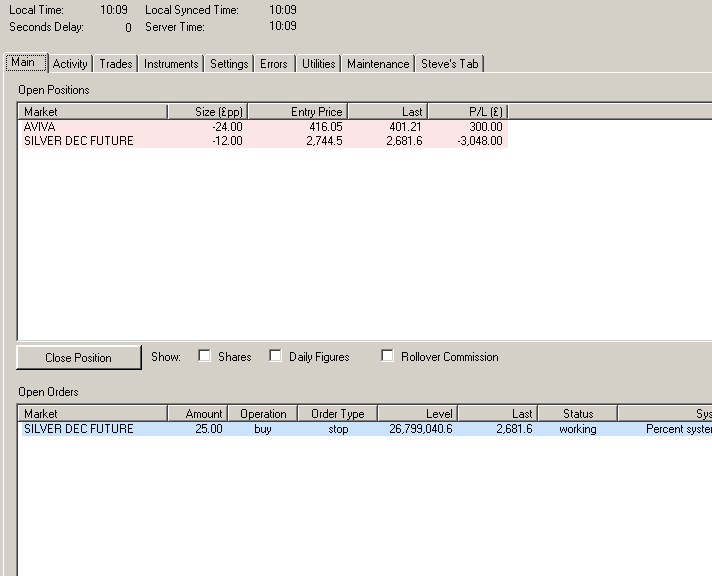
This figure was also incorrectly displayed in the Open position window. See video clip and image.
Their background has alternate stripes white grey white grey ( which helps you keep your eyes on the right line)
Martin and I both agreed that we should see the stop price in the top window for clarity, as when many trades are added, then you will have to scan down the lower window to see where the stop is.
The below image shows a clearer layout, (slightly altered IG view)
The whole background could do with being the light grey tone used by IG aswell.
If possible can you add the cost and value cells to the right side.
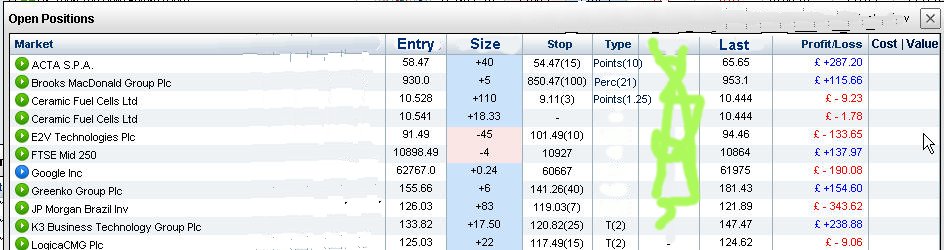
- Lighten whole background (on all the form pages) so as to look as much like IG as possible
- Place the pink and blue highlights only on the size column and dont show lines accross as in picture
- Rename size (£pp) to Size
- In the IG window there is no decimal places on the £ pp, unless it is 0.34 or something, and their values are centred, if you can copy that it would help clarity
- Place Entry price column in position 2 to the left of size and rename to Entry
- Place stop price in the upper window to the right of size column as in picture.
- Rename P/L (£) Column to Profit/ Loss
- The market column should show the names in lower case only with capital at the start.
- Add £ signs to the column values as in the IG photo
- Shade alternate rows to match photo ( to help the viewers eyes stay on the correct line)
- Place cost column to the right of Profit loss
- Place value column to the right of Cost
- Alignments of the columns. Market (left) all other columns can be (central)
- If all these features have show hide boxes and are the columns are moveable to suit the user, then all of us can make the layout we prefer without the need for making "different versions"
- In our "account" section on the main page, the minus signs appear before the £ signs, where as in the IG pages it shows £ -223.2 which looks a bit clearer and more familiar. if you could match that too it would be good.
- The lower "open orders" box can be changed to the same colour and font format as in the photo
- The "system" window in the open orders window needs the font to be aligned to the left.
- Need + and - signs on the display for "Amount" and please rename it to "Size"
- Add capital letters to the buy and sell comments in the "Operation" Column
- Add capital letters to the Order type "stop" change to Stop
- The little green icons next to they symbol could be employed as well and changed to blue when that market is closed.
The small white box has some letters next to it which looks like equity but shows as *quity due to some sizing error. I am not sure what the risk per trade model information is meaning when it says £1 per point/pip 1,000 equity?